Trino Deployment
Our Trino deployment aims to ensure high availability (active-active), scalability, and zero-downtime updates using two active clusters, trino-0 and trino-1, managed by a Trino Gateway. The gateway balances query load, caches query states by Query ID, and validates cluster health using the UI_API monitor type to ensure each coordinator has at least one active worker.
Zero-downtime updates ensure that at every point in time, there is always a healthy and active Trino cluster, while the other cluster undergoes a graceful shutdown and update process. This approach is orchestrated using ArgoCD sync waves, which control the order and timing of updates to prevent disruptions to active workloads.
Architecture Overview
Our Trino deployment is split into two planes:
- Online: user-facing queries routed through
trinogatewayto the online Trino clusters. - Offline: background and long-running workloads routed through
trinogateway-offlineto the offline Trino clusters.
The gateway layer also enables an A/B cluster layout so we can keep one set of coordinators/workers serving traffic while the other is updated.
This A/B setup exists specifically to prevent downtime. Trino coordinators do not support a true graceful shutdown, so we avoid manual syncs that would drain traffic in-place. Instead, we switch the active backend set in Trino Gateway to move traffic from (A) to (B) (or back), which preserves ongoing queries and keeps the service available. During incidents, we can perform the switch manually from the Trino Gateway UI: https://trinogateway-default-prod.vega.teleport.sh/
Routing Diagram
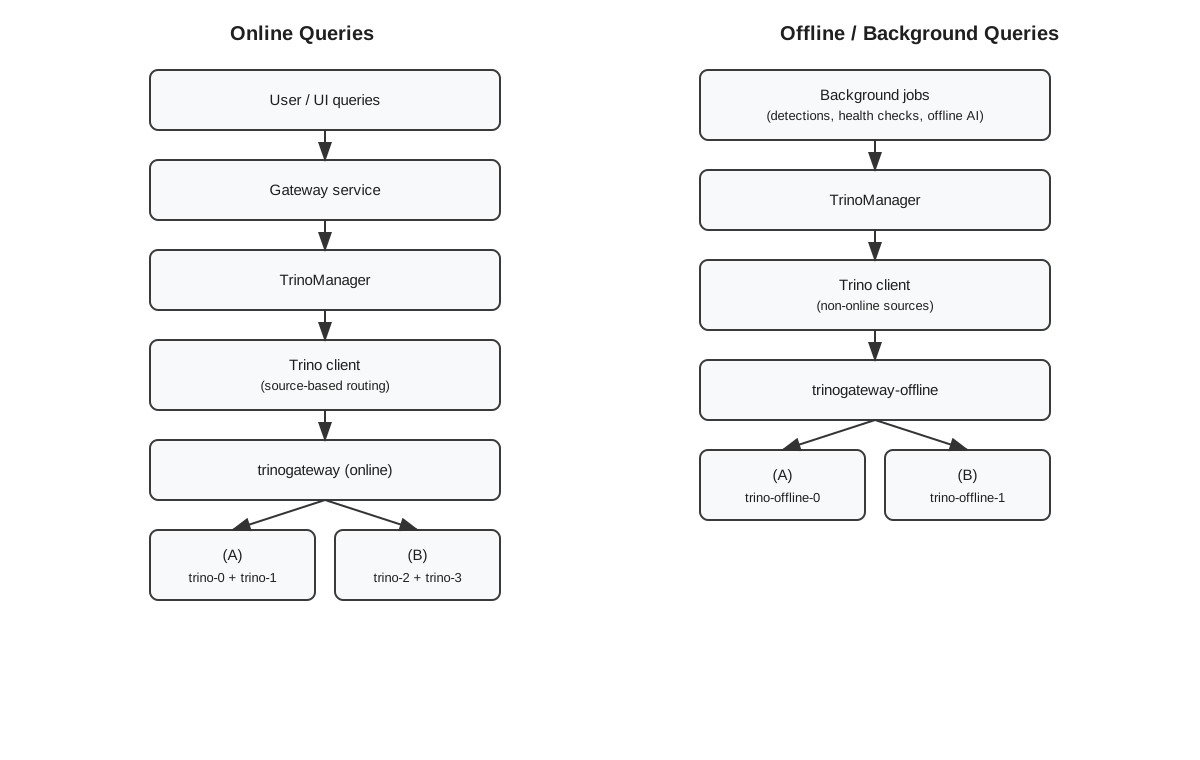
A/B Online Clusters
- We run two online Trino sets in an A/B layout:
- (A)
trino-0+trino-1(trino) - (B)
trino-2+trino-3(trino-app-2, when deployed)
- (A)
- The active backend set is controlled in the
gateway_backendtable. Switching the active flags lets us shift traffic between A and B without changing client configuration.
A/B Offline Clusters
- Offline Trino runs as a pair:
trino-offline-0andtrino-offline-1. - The offline gateway manages these backends in
gateway_offlineand can switch the active set the same way as online, keeping long-running workloads available during updates.
Online vs Offline Trino
- Query routing is source-based. The
QuerySourceOnline*list inservices/go/common/trino/connection.goalways routes to the online gateway. - When
TrinoOfflineServiceHostis configured (most non-tilt environments), all other query sources route totrinogateway-offline. If the setting is empty (local/tilt), everything uses the online gateway. - Offline Trino clusters (
trino-offline-0andtrino-offline-1) are registered in the offline gateway database (gateway_offline).
High-Level Diagram
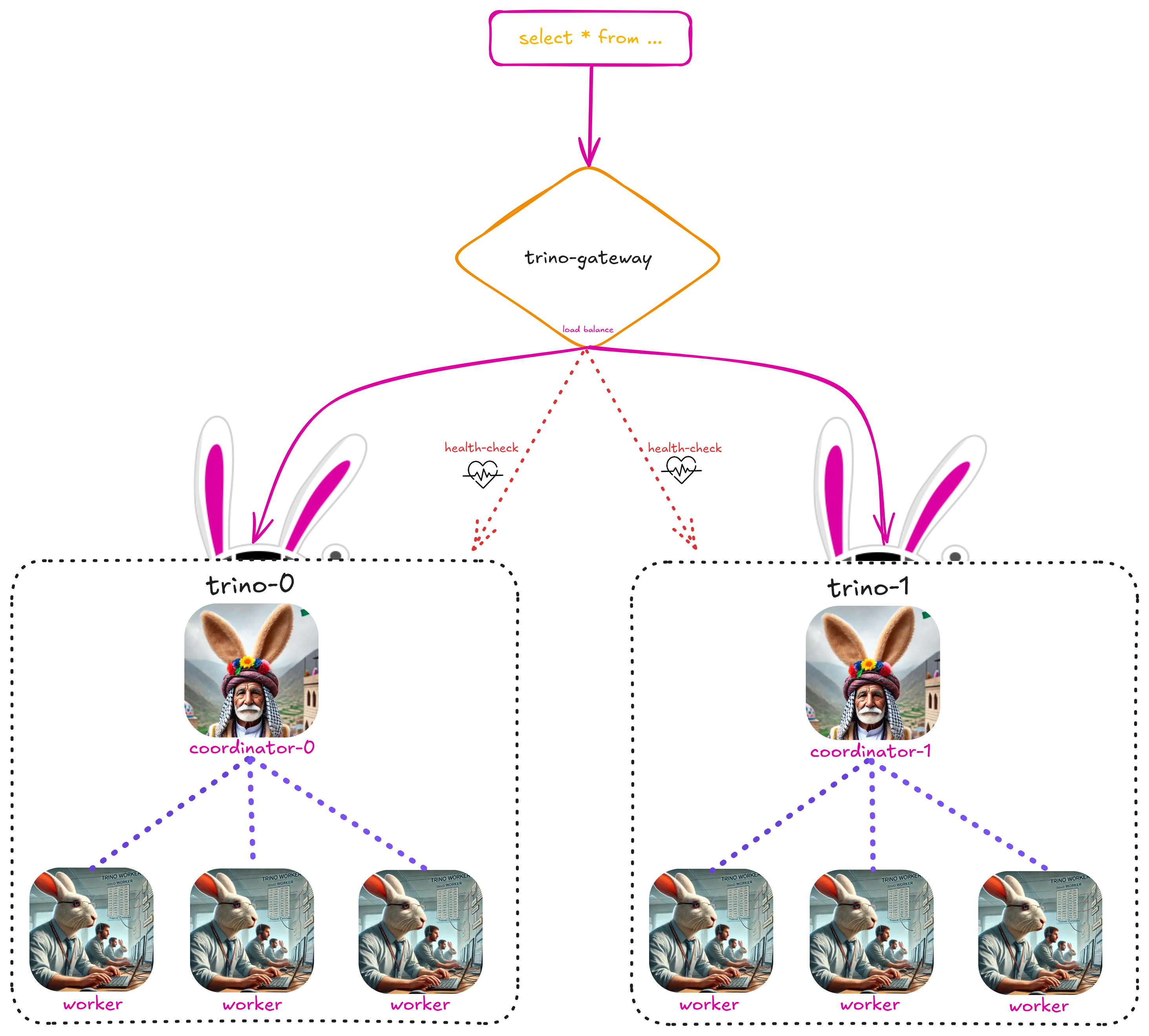
Trino Gateway
Purpose
The Trino Gateway serves as a load balancer, query router, and health monitor for our Trino clusters. It ensures high availability, consistent query routing, and cluster health validation. We run two gateway deployments:
- Online:
trinogatewaywith state stored in thegatewaydatabase. - Offline:
trinogateway-offlinewith state stored in thegateway_offlinedatabase.
Each gateway persists backend state in gateway_backend, along with query history in query_history. The online gateway manages trino-0/trino-1 (and optionally trino-2/trino-3), while the offline gateway manages trino-offline-0/trino-offline-1.
Teleport Access (Prod)
Key Responsibilities
-
Query Routing:
- Queries are distributed across the two clusters (
trino-0andtrino-1) using the default router, which selects a backend randomly for each query. - Query states are cached based on their Query ID, ensuring follow-up requests for the same query are consistently routed to the original backend.
- Queries are distributed across the two clusters (
-
Health Monitoring:
- It performs regular health checks on all configured Trino backends at a set interval.
- We use the UI_API monitor type, which validates that the backend’s coordinator has at least one active worker using the
/ui/statsAPI.
-
Graceful Shutdown:
- It provides an API for cluster deactivation, ensuring no new queries are routed to a deactivated backend.
- Active query states can still be retrieved using their Query ID.
4. Persistent Query History:
- It stores query history in the
gatewaydatabase inquery_history. - This historical data provides insights into past queries, supporting troubleshooting, auditing, and performance analysis.
Zero-Downtime Deployment Considerations
Achieving zero-downtime deployment in Trino requires addressing the following key challenges:
-
Prevent Query and Task Loss:
- Active queries and tasks must be allowed to complete before shutting down coordinators or workers.
-
Avoid Coordinator-Worker Mismatches:
- New coordinators should not attempt to assign tasks to old workers that might already be shutting down.
- Workers should be updated before coordinators to prevent mismatched states during query assignment.
-
Seamless Traffic Management:
- The Trino Gateway must ensure no new queries are routed to a cluster during updates while still allowing in-progress queries to complete gracefully.
-
Cluster Readiness Validation:
- After updates, each cluster must be verified to ensure it is ready to handle incoming queries before being reactivated in the gateway.
ArgoCD Sync Waves: Zero-Downtime Updates
To address these considerations, we orchestrate our updates using ArgoCD sync waves:
| Wave | Operation | Description |
|---|---|---|
| -1 | Deactivate trino-0 |
Prevents new queries from being routed to trino-0, allowing active queries to complete. |
| 0 | Sync trino-0 workers |
Workers are gracefully shut down using a preStop hook, defined by the worker.lifecycle configuration. This ensures active tasks complete before shutdown when worker.gracefulShutdown is enabled. |
| 1 | Sync trino-0 coordinator |
Coordinators are gracefully shut down using a preStop hook. Unlike workers, this behavior relies on our custom configuration to monitor and ensure queued and running queries finish before shutdown. |
| 2 | Activate trino-0 |
Verifies that workers are ready before reactivating trino-0 for query traffic. |
| 3 | Deactivate trino-1 |
Prevents new queries from being routed to trino-1, allowing active queries to complete. |
| 4 | Sync trino-1 workers |
Workers are gracefully shut down using a preStop hook, defined by the worker.lifecycle configuration. This ensures active tasks complete before shutdown when worker.gracefulShutdown is enabled. |
| 5 | Sync trino-1 coordinator |
Coordinators are gracefully shut down using a preStop hook. Unlike workers, this behavior relies on our custom configuration to monitor and ensure queued and running queries finish before shutdown. |
| 6 | Activate trino-1 |
Verifies that workers are ready before reactivating trino-1 for query traffic. |
This sequence guarantees that updates occur in a controlled and predictable manner, avoiding mismatched states between workers and coordinators while ensuring ongoing queries and tasks complete without interruption.
Graceful Shutdown Workflow
Graceful shutdown behavior differs slightly between workers and coordinators, as Trino natively supports worker shutdown via lifecycle hooks but requires additional steps for coordinators.
Worker Graceful Shutdown
- Trino supports graceful shutdown for workers as documented in the official Trino documentation.
- A preStop lifecycle hook ensures that active tasks complete before the worker is shut down.
- This is crucial during pod autoscaling, ensuring that active tasks complete successfully before the worker pod is terminated, preventing task loss and query failures.
Coordinator Graceful Shutdown
- Trino doesn’t natively support graceful shutdown for coordinators.
- To handle this, we use a preStop hook that polls the stats until:
- Queued Query Count = 0
- Running Query Count = 0
- The Coordinator Java process is terminated only after both conditions are met or the timeout has elapsed.
This approach ensures that no queries are lost during coordinator updates.
Optimization Opportunities
-
Query Routing Optimization:
- Currently we use the default router, which randomly selects a backend for query routing.
- We should consider switching to the
QueryCountBasedRouter, which routes queries to the least loaded backend for each user (based on queued and running query counts). Alternatively we can implement a custom router tailored to our workloads and cluster behavior.
-
Adaptive Cluster Scaling:
- Monitor worker and coordinator load dynamically.
- Use auto-scaling mechanisms to adjust cluster size based on query volume and resource consumption.
-
Enhanced Health Monitoring:
- Leverage Trino Gateway’s
/metricsendpoint, which exposes health metrics in OpenMetrics format, for integration with Datadog. Configure Datadog to scrape these metrics, enabling visibility into resource usage, thread pool states, and backend performance. Set up custom alerts in Datadog to proactively detect and address degraded backend performance and ensure system reliability.
- Leverage Trino Gateway’s
-
Enable Fault-Tolerant Execution (FTE):
- Enable FTE to persist query states in external storage (e.g., S3), ensuring seamless query recovery after coordinator or worker failures and improving reliability during errors.
Running a local environment
When running trino locally you need to run trino-server-dev. There’s an existing run config for intellij undex .run folder.
Pay attention trino queries the endpoint API to get the connectors urls, for inner cluster services (postgresql & quickwit) it will
pass the cluster hostname of the services:
- For postgresql you can add this line to your
/etc/hosts-127.0.0.1 postgresql - For Quickwit you can patch the
getQuickwitURIfunction inservices/go/endpoints/grpc/server.goso it would return localhost. (You can also add the hosts to the/etc/hostslike the postgesql).